
Floerns plaid shirt
Plaid shirt.
Read more →Affiliate Disclosure: Elite AI Finds earns a commission from qualifying purchases made through links on this page. This never affects our editorial recommendations — we only feature products we genuinely recommend. Learn more →
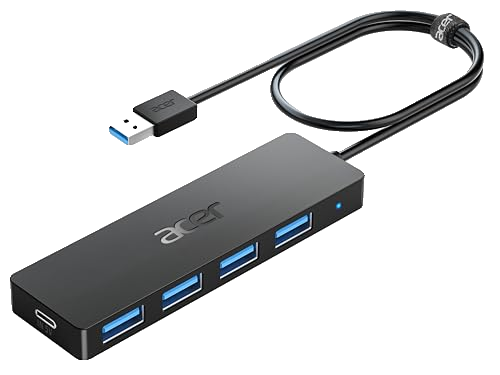
The Acer 4-Port USB 3.0 Hub instantly quadruples your available USB-A connections with blazing-fast 5 Gbps transfer speeds and a no-fuss plug-and-play setup. The 2-foot bus-powered cable keeps your desk clean without needing an extra power adapter. A straightforward, reliable choice for students and home office workers who constantly run out of ports.
📖 Read our full in-depth review →Score Breakdown
Affiliate link — we may earn a small commission at no extra cost to you
✅ Pros
❌ Cons
Running out of USB ports is one of those small frustrations that somehow derails an entire workday. You need your mouse, your keyboard, your flash drive, and your external drive all connected at once — and your laptop has exactly two ports to offer. The Acer 4-Port USB 3.0 Hub is designed to solve exactly that problem, and it does so without the bloat of unnecessary features or a confusing setup process.
At its core, this is a straightforward 4-port USB-A hub that connects to your laptop or PC via a single USB-A plug on a 2-foot cable. Once plugged in, it immediately expands your connectivity to four full-size USB-A 3.0 ports. No software downloads, no driver installation, no configuration menus — it simply works the moment you plug it in, across Windows, macOS, Linux, and Chrome OS alike.
The standout specification here is the USB 3.0 standard, which supports data transfer speeds of up to 5 Gbps per port. That's a meaningful real-world upgrade over the USB 2.0 hubs that still flood the budget market. If you've ever watched a progress bar crawl while transferring a folder of RAW photos or a large video project to an external drive, you'll immediately appreciate the difference. Day-to-day tasks like syncing a smartphone or using a wireless receiver feel snappy and responsive.
The 2-foot cable strikes a practical balance. It's long enough that you can place the hub in a comfortable spot on your desk — away from the laptop's edge, easily reachable — without creating a tangled mess of excess cable. It's also short enough to prevent signal degradation, which can occasionally be an issue with longer passive USB cables. The hub itself is compact and light, fitting neatly beside a laptop stand or keyboard without demanding much real estate.
Being bus-powered is both a strength and a limitation worth understanding. On the positive side, you eliminate the need for a wall adapter entirely, making this hub genuinely portable. Toss it in your laptop bag and you'll always have four ports available wherever you go. The tradeoff is that high-power devices — particularly 2.5-inch external hard drives that draw significant current — may not function reliably when multiple power-hungry devices are connected at once. For most users whose everyday lineup consists of a mouse, keyboard, flash drive, or USB dongle, this will never be an issue. Power users with demanding peripherals may want to look at an externally powered hub instead.
One thing notably absent from this hub is individual per-port power switches. You can't toggle a single port off without unplugging the device from it. For most use cases this is a non-issue, but users who frequently hot-swap devices or want granular power management may find this limiting compared to some premium alternatives.
As for compatibility, the USB-A host connector is worth a quick consideration. Older laptops and desktop PCs will have no issues at all. Modern thin-and-light laptops from Apple, Dell, HP, and others increasingly ship with only USB-C or Thunderbolt ports, which means you'd need a separate USB-C to USB-A adapter to use this hub. That's not a flaw with the product itself, but it's a factor to check before purchasing.
Who is this hub best suited for? Students carrying it between home and campus, home office workers building out a tidy desk setup, and general users who simply need more ports without complicating their lives. It's not a hub for video production workstations with high-power drives and audio interfaces all running simultaneously — for that, a powered hub with more robust specs is warranted. But for the vast majority of everyday users, this Acer hub covers every base that matters.
On the value front, the Acer name carries more accountability than the dozens of generic no-brand hubs at similar price points. You're getting USB 3.0 speeds, a clean design, reliable plug-and-play performance, and cross-platform compatibility backed by a recognized manufacturer. For anyone who finds themselves constantly juggling USB cables or borrowing ports from other devices, this hub is an easy, low-cost fix that genuinely improves your daily computing experience.
Expert Score
Elite AI Finds Rating
The Acer 4-Port USB 3.0 Hub instantly quadruples your available USB-A connections with blazing-fast 5 Gbps transfer speeds and a no-fuss plug-and-play setup. The 2-foot bus-powered cable keeps your desk clean without needing an extra power adapter. A straightforward, reliable choice for students and home office workers who constantly run out of ports.
Ready to buy?
Price and availability can change at any time — confirm on the retailer's site.
Price and availability can change at any time — see the current price on the retailer's site.
Check Best Price →Affiliate link — no extra cost to you
Our AI agents research thousands of products so we surface only the best.
We analyze thousands of reviews, specs, and price histories across the web.
No paid placements. Rankings are based purely on value, quality, and performance.
Listings are checked regularly so picks, links and details stay current. See the retailer for today's price.
Every product earns a 1–10 score across four dimensions.
Performance
Speed, reliability, and real-world results
Value
Price vs. quality across competing options
Ease of Use
Setup time and day-to-day usability
Build Quality
Materials, durability, and longevity
Featured Products
As an Amazon Associate, we earn from qualifying purchases. Disclosure
Floerns plaid shirt
Plaid shirt.
Read more →
Ogrmar 2 Pack Stuffed Turkey Couple Doll Thanksgiving Table Decoration
Two stuffed turkey dolls sold as Thanksgiving table decoration, per the listing. In stock on amazon.com with Buy Now available when we checked on Nov 2, 2026.
Read more →
Relaxium Sleep capsules (30-day)
Melatonin 5 mg with magnesium, per the maker. Relaxium is a line of over-the-counter sleep supplements developed by Dr. Eric Ciliberti, MD, a neurologist, according to the brand.
See our review →
Relaxium SleepQuick Gummies
Chewable sleep gummies, per the maker. Relaxium is a line of over-the-counter sleep supplements developed by Dr. Eric Ciliberti, MD, a neurologist, according to the brand.
See our review →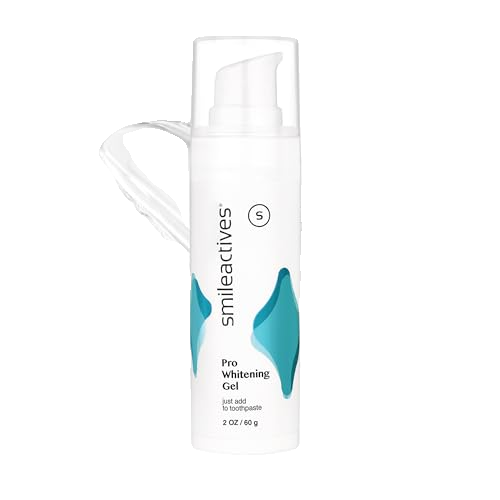
SmileActives whitening gel, 2 oz
Add-to-toothpaste whitening gel. SmileActives Pro Whitening Gel is a hydrogen peroxide gel you pump onto your toothbrush with your usual toothpaste. The maker says its "Polyclean" foam helps carry the whitening ingredient into grooves and crevices to lift…
See our review →
SmileActives whitening gel, 3.8 oz
90-day supply size, per the listing. SmileActives Pro Whitening Gel is a hydrogen peroxide gel you pump onto your toothbrush with your usual toothpaste.
See our review →
SmileActives whitening gel, 3-pack
Three 1 oz pumps. SmileActives Pro Whitening Gel is a hydrogen peroxide gel you pump onto your toothbrush with your usual toothpaste. The maker says its "Polyclean" foam helps carry the whitening ingredient into grooves and crevices to lift surface stains…
See our review →
Kidde Smart CO Detector + Indoor Air Quality (COPDLQW)
Plug-in smart CO alarm with AA backup. Low-level CO alert at 30-70 ppm, per the maker.
Read more →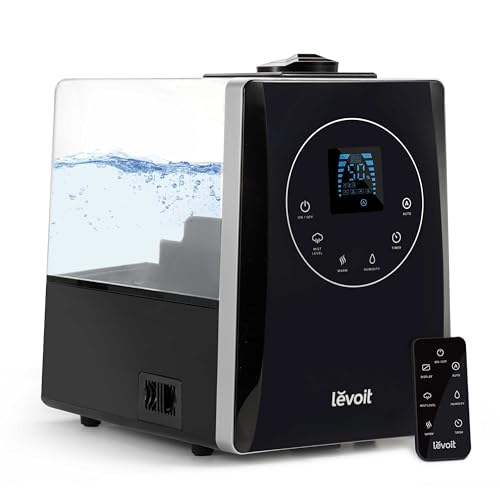
Levoit LV600HH 6L Warm & Cool Mist Humidifier
6-liter warm and cool mist humidifier with built-in humidity sensor, per the listing.
Read more →Acer USB Hub 4 Ports, Multiple USB 3.0 Hub, USBA Splitter for Laptop/PC 2FT
See price on Amazon
Elite AI Assistant
Ask me anything about products
Hi! I'm your AI product assistant. Ask me to find the best products, compare options, or answer any product questions. I search our expert catalog first, then tap into live AI research if needed.
Powered by RAG + Perplexity · Gemini · Claude